
Documentation's navigation
In this section
On this page
What is in a Footer?
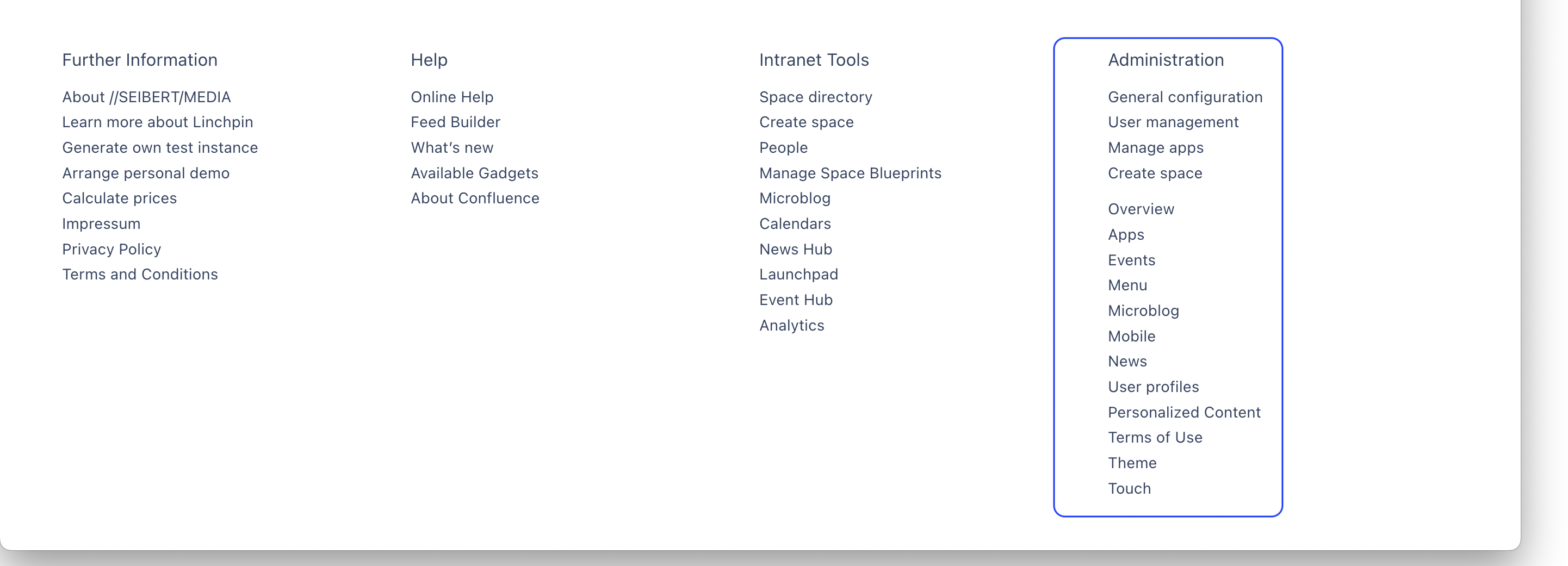
A footer is at the end of any page of your Linchpin website and is made of columns.
Reminder: The right column called "Adminstration" is only visible for admins.
The links in the columns "Help" and Intranet "Intranet Tools" are depended on what you've installed in your Confluence instance.
How do I access the footer configuration?
Navigate to Confluence administration > Linchpin Theme > Configuration > Footer.
Alternatively, click on the settings icon in your Linchpin header, then click on Theme > Footer.
What can I customize in the footer configuration?
You can not only customize the backgroud color, the color of the headlines and the color of the links, but also add up more columns to the already existing ones (Online Help, Intranet Tools and Administration).
How do I customize the color of the background, headlines and links?
Learn how to do that .
How do I customize the columns in my footer?
Learn how to do that.

☁️ Looking for a Cloud-based Intranet?
Check out Mantra, your go-to alternative to Linchpin in the Atlassian Cloud!
Mantra is your a comprehensive solution for connecting teams, making collaboration a breeze, and keeping your company's internal communication strong and streamlined - all in the cloud.