
Agile Hive version restriction
Use this guide only if you are on version 4.12.0 and newer of the Agile Hive Suite. For the version 4.11.2 you have to use the Suggestions-API – Recreate missing SprintReferences (only v4.11.2) – which is a bit more lightweight but limited.
Four points on this page depend on your version and are marked from 4.13.0 where they occur: the two recommendations NO_CANDIDATES_PAST_ITERATION and PLANNING_INTERVAL_DATES_INCOMPLETE, the permissions needed for Recreate Missing Sprints, and the default of dryRun. Before 4.13.0 an ended iteration without a matching sprint is reported as plain NO_CANDIDATES – do not follow its recreate advice there, because recreate skips finished timeboxes – and a Planning Interval with a missing iteration date makes the analysis fail instead of reporting the problem.
What is the purpose of this feature?
In Agile Hive, every iteration of a Planning Interval is connected to its Jira sprint by a sprint reference. In current versions this reference is only removed when the sprint itself is deleted (which is expected). A reference that breaks while its sprint still exists – disconnected, pointing at the wrong sprint, duplicated, or missing its project – practically only arises from fault states or as leftover damage from older versions.
Typical symptoms: capacity fails to save, the burn-up chart jumps, a sprint disappears from the team report, or the Health Check reports missing or duplicate sprints. The Agile Hive Public API lets a Jira administrator analyze the affected team project and restore the correct connections – without touching any sprints or issues.
This guide shows how to find and fix lost or wrong sprint references using the Agile Hive Public API (the public REST interface under /rest/agilehive/latest/public/). It also covers the case where pressing Recreate Missing Sprints has already created an empty duplicate sprint.
Before you start
The analysis and repair calls must be made by a Jira administrator. Other users receive HTTP 403; a call without authentication receives HTTP 401.
A valid Agile Hive license.
The project key of the affected team project (not the ART project).
Recreate Missing Sprints, which this guide points to in several places, needs different permissions depending on your version:
Before 4.13.0: a Jira administrator, same as the API calls.
From 4.13.0: Browse Projects plus Manage Sprints in the team project are enough, so a Release Train Engineer or team lead can run it. Pressing the button in the Agile Hive project settings additionally requires Administer Projects for that project.
In both versions the action refuses while the team's configured primary board contains issues of more than one project – in the project settings the button is then not offered at all.
In the examples below, user:password, JIRA-BASE-URL and TEAM-KEY are placeholders.
Flow Chart
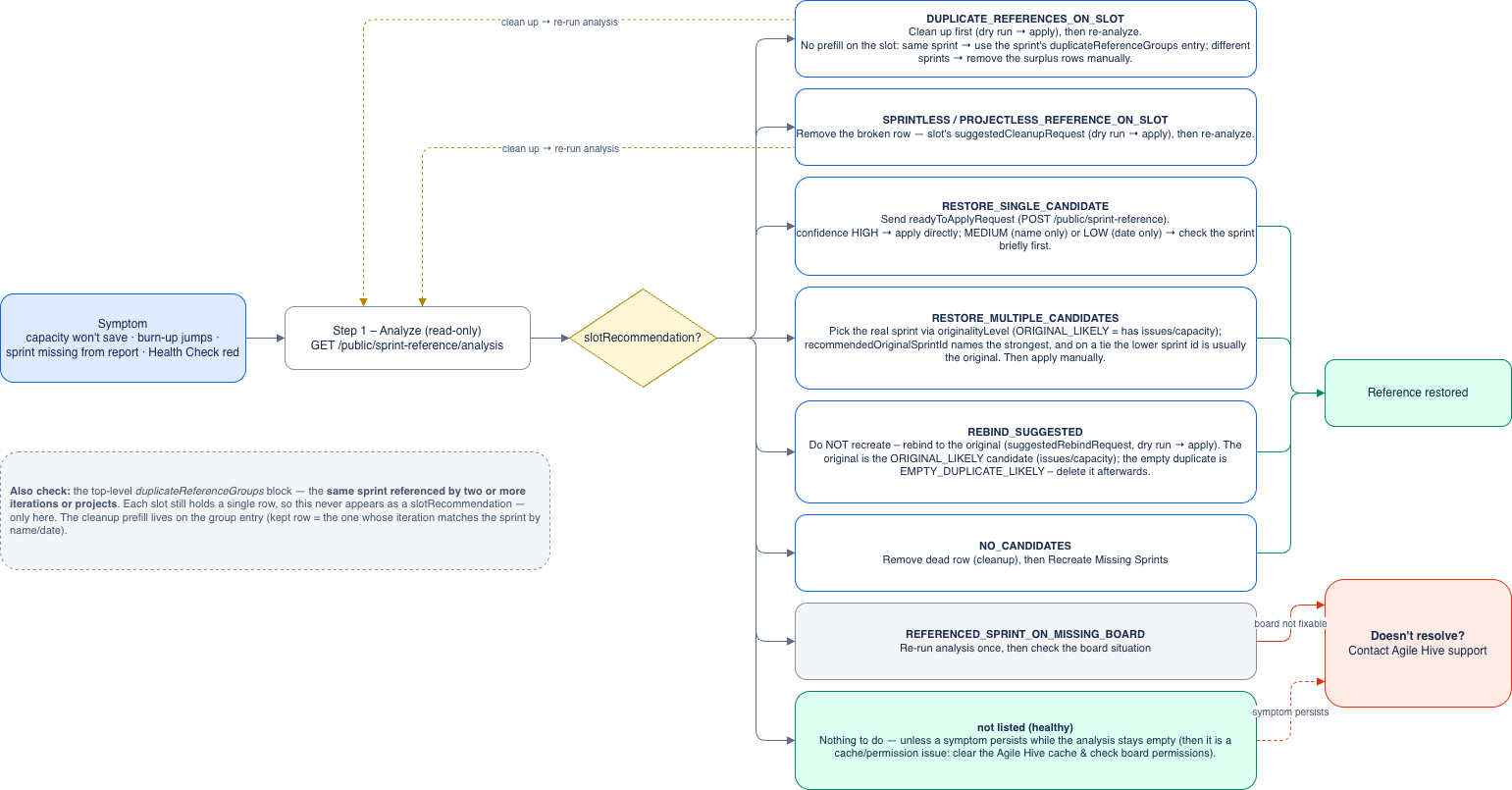
Step 1 – Analyze
Always look at the analysis first. It is read-only and never creates a sprint.
curl -u user:password 'JIRA-BASE-URL/rest/agilehive/latest/public/sprint-reference/analysis?projectKey=TEAM-KEY'
The analysis lists only the iterations that need attention. Healthy ones do not appear. Per iteration you get:
the matching sprints, with issue count, planned capacity and sprint state
what to do – in the field
slotRecommendationreferencedSprints, if the iteration already holds a reference: the sprint it currently points at, with name and board id. This is the only place that identifies that sprint when it is not among the candidates.
If everything can be restored cleanly, the response contains a ready-made request body in the field readyToApplyRequest that you can send straight back in Step 2.
Slots and candidates
A slot is the connection point for one iteration – the place in Agile Hive where its sprint reference lives. Every iteration has exactly one slot, whether or not it currently holds a working reference. A candidate is a Jira sprint that the analysis considers a possible match for that slot, based on project, dates, or name. A slotRecommendation always describes what to do with the slot. The recommendations differ mainly in how many candidates were found and how confident the analysis is.
What the recommendation means
Recommendation | What it means | What to do |
|---|---|---|
RESTORE_SINGLE_CANDIDATERestore – the sprint still exists (one clear candidate) | The reference is missing and exactly one matching sprint exists. | It is already included in |
| The reference is missing and several sprints match. | Compare issues and capacity, pick the right sprint, and apply that one manually (Step 2). |
REBIND_SUGGESTEDReference points at the wrong sprint – rebind needed | A reference exists but points at the wrong sprint – usually an empty duplicate, while the original still exists. | Do not press Recreate Missing Sprints. Rebind the reference using the ready-made suggestedRebindRequest from the slot (see Repairing references). |
DUPLICATE_REFERENCES_ON_SLOTDuplicate sprint references – clean up first | The iteration carries more than one reference (a broken state). | Clean up first. There is no prefill on the slot itself:
|
SPRINTLESS_REFERENCE_ON_SLOTReference names no sprint – clean up first | The iteration carries a reference row that names no sprint (structurally broken). The actual sprint may still exist. | Remove the broken row using |
PROJECTLESS_REFERENCE_ON_SLOTReference names no team project – clean up first | The reference row names a sprint but no team project (structurally broken), so the iteration has no working sprint. Reported only when nothing else connects the iteration. | Remove the broken row using suggestedCleanupRequest, then run the analysis again – the sprint then shows up as a restore case. |
NO_CANDIDATESNo matching sprint on this project's boards – use "Recreate missing sprints" | No sprint on this project's boards matches the iteration. Usually the sprint really was deleted – but an empty lookup can also come from a board that is not visible to the Agile Hive admin user, or from a sprint list that still lags behind on another node. The recommendation therefore only states that no sprint could be found, not that one was deleted. | If the analysis offers a |
| The same situation as | No sprint can be created or restored for this slot: Recreate Missing Sprints only works forward and silently skips finished timeboxes, so recommending it would send you to a button that reports nothing and changes nothing. A dead reference row on such a slot can still be removed with a hand-written |
| One of the Planning Interval's iterations has no start or end date. Without the dates the order of the iterations cannot be determined – and the expected sprint name is derived from that order – so the whole Planning Interval is left unjudged. Reported once per affected Planning Interval, not once per iteration. A Planning Interval whose own end date is missing is not reported this way; its slots appear as | Repair the stored iteration dates; they are mandatory. For a Planning Interval that has already ended this is a database correction – involve Agile Hive support. The field |
REFERENCED_SPRINT_ON_MISSING_BOARDReferenced sprint has no enumerable board – contact support | The referenced sprint exists but is no longer on any board of the project. | Re-run the analysis once – this can appear briefly right after a Recreate. Then check the board situation or contact Agile Hive support.
|
Duplicate reference groups
Besides the per-iteration recommendations, the analysis has a top-level duplicateReferenceGroups block. It catches a duplicate that the slot view cannot show: the same sprint referenced from more than one iteration or project. Each individual slot then still holds a single row, so it never appears as a DUPLICATE_REFERENCES_ON_SLOT recommendation – only here.
Each group lists the sprintId and the coordinates of every row: iterationId, projectId, plus that project's key and name. A row can belong to a different project than the one you analyzed – that is what this block is for.
One row clearly qualifies to be kept – it belongs to this team project and its iteration matches the sprint by name or date: the group carries a ready-made
suggestedCleanupRequestthat deletes the others.No row clearly qualifies: the field stays empty, you decide manually.
Step 2 – Apply the fix
Once you are happy with the analysis, apply the checked connections. The right endpoint depends on the recommendation:
Restore a missing reference
The analysis delivers the finished body in readyToApplyRequest. Send it back to reconnect all clean cases at once:
curl -u user:password -X POST 'JIRA-BASE-URL/rest/agilehive/latest/public/sprint-reference' \
     -H 'Content-Type: application/json' \
     -d '{
           "projectKey": "TEAM-KEY",
           "mappings": [
             { "iterationId": 123, "sprintId": 456 }
           ]
         }'
The response reports success or a reason per mapping. The call is safe to repeat, and one failing mapping does not block the others. It has no dry run – it writes straight away, and it only fills empty slots.
Repairing references (rebind and cleanup)
Two additional endpoints handle the broken cases: POST .../sprint-reference/rebind moves an existing reference to a different sprint, and POST .../sprint-reference/reference-cleanup removes surplus, dead or structurally broken reference rows.
Cleanup and rebind change existing rows, so they come as their own request bodies. readyToApplyRequest never contains them – it only ever fills empty slots. Where to find the prefills:
suggestedRebindRequest– on a slotsuggestedCleanupRequest– on a slot, or on aduplicateReferenceGroupsentry
Order: clean up duplicates first, then rebind, then restore. The flow is always the same:
Copy the pre-filled request from the analysis. Both prefills carry
dryRun: true. Always send that field explicitly – before 4.13.0 a body that omits it counts asfalseand writes immediately, from 4.13.0 an omitted field defaults totrue. The restore call above has nodryRun: true.Send it unchanged (dry run) and check the outcome per operation – nothing is written yet.
Set
dryRuntofalseand send again.Run the analysis once more – the handled iterations no longer appear.
Outcome values
Only APPLIED writes. Every other value leaves the row untouched.
NOOP_ALREADY_ABSENT,NOOP_ALREADY_DEDUPLICATED,NOOP_ALREADY_TARGET– the desired end state was already reached. Repeating a request is safe.STALE_STATE– the state changed since the analysis. Run the analysis again and rebuild the request.NOT_IN_SCOPE(cleanup only) – the row belongs to neither this team project, nor this ART, nor a sprint of this project. A safety guard against a mistyped request.Rebind only:
DUPLICATE_REFERENCES_ON_SLOT(clean up first),SPRINT_NOT_FOUND,ITERATION_NOT_FOUND,WRONG_ART,NOT_CANDIDATE(the target sprint is on no board of this project),TARGET_SPRINT_ALREADY_REFERENCED(the target already carries a reference somewhere).
When this is not the right tool
Restoring a reference only helps when the sprint still exists. It is not the right tool in these cases:
No matching sprint is findable –
NO_CANDIDATES. Recreate it with Recreate Missing Sprints; if a dead reference row blocks that, remove the row first with a cleanup. See the table above for what to check when the sprint ought to still exist.- The iteration has already ended –
NO_CANDIDATES_PAST_ITERATION(from 4.13.0). Nothing here can be repaired. See the table above. - A stored date is missing –
PLANNING_INTERVAL_DATES_INCOMPLETE(from 4.13.0). Repair the iteration dates first. See the table above. The referenced sprint has no board –
REFERENCED_SPRINT_ON_MISSING_BOARD. See the table above.A sprint exists but is not shown in a board or report, while the analysis reports nothing wrong. This is a permission or cache issue, not lost data. Clear the Agile Hive cache and check board permissions instead of touching the references.
Good to know
The analysis is read-only and never creates a sprint. Only Step 2 writes, and it only connects existing sprints (or removes a broken reference during cleanup).
Every repair is reversible: a rebind can be reverted, and a removed row can be restored with the reconnect call (rows of your own team project). Only reference rows are ever moved – never sprints or issues.
Every operation names the expected current state and is re-checked before writing. If the state changed in the meantime, the server answers with
STALE_STATEinstead of writing blindly – just run the analysis again.The analysis reads the Agile Hive data uncached, so changes there are visible immediately. The sprints it can see come from Jira Software and are cached on that side – on a multi-node instance a very recent sprint change can lag behind by a cache replication.
The analysis and the repair endpoints are expensive: run them for individual projects on demand, preferably at low system load, not periodically across many projects. A single repair request allows up to 200 operations.