
Documentation's navigation
On this page
View participants
While in the event overview, click on the "Participants" tab to manage the participants of the event.
There are two ways to get to the participants tab:
- Click on the event's cover image or title, then choose the "Participants" tab.
- Click on the "⋯" button and choose "Manage participants".
Add participants
Click on " Add participant" and type in the user's or guest's name. Click on "+add".
The new participant will be notified about being signed up.
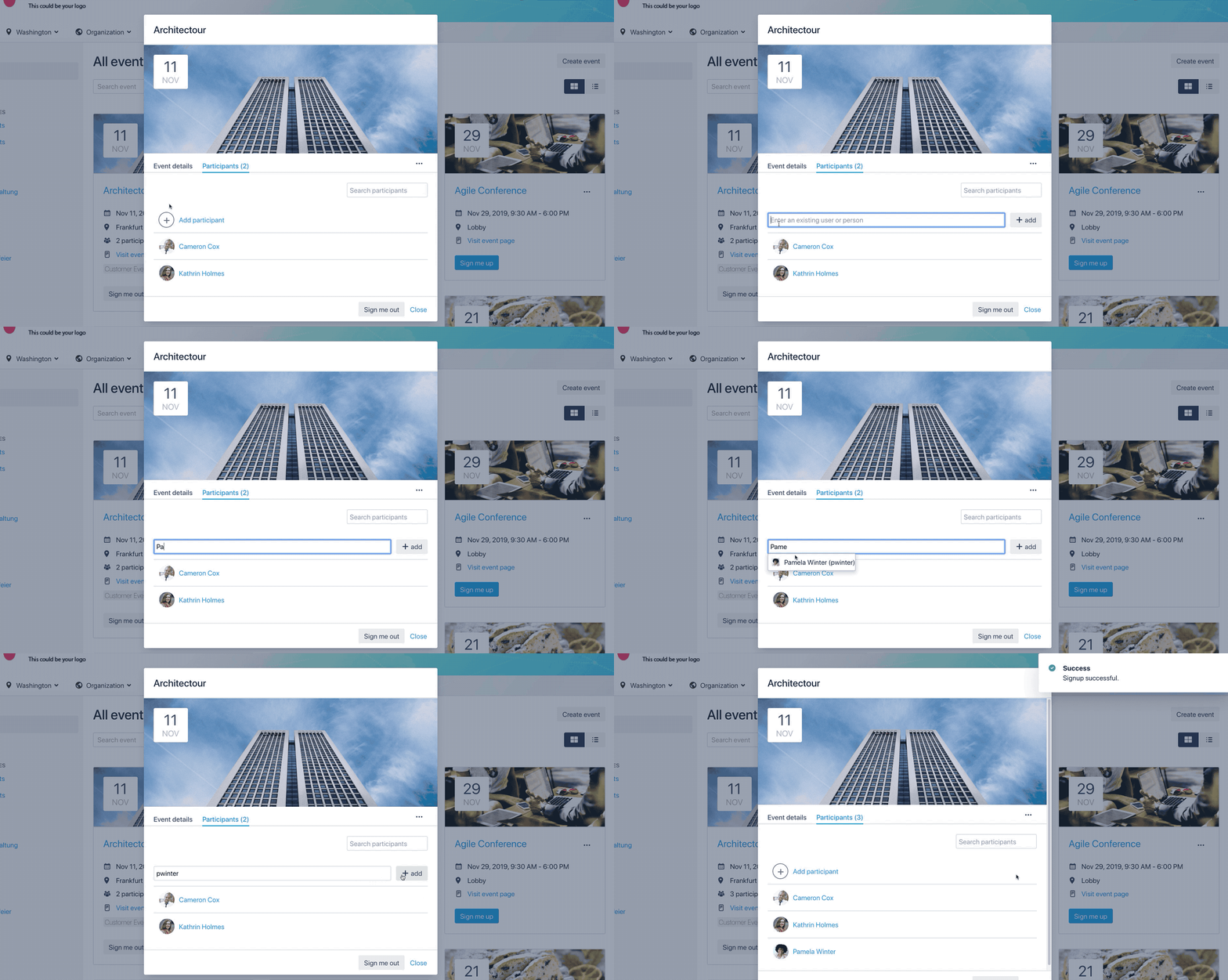
Admins, event editors and event creators can always add/remove event participants and see the list. Even if those functions are disabled for normal users.
Want to know how to add more details to your events? Click here!
Want to know how to sign yourself up? Click here!

☁️ Looking for a Cloud-based Intranet?
Check out Mantra, your go-to alternative to Linchpin in the Atlassian Cloud!
Mantra is your a comprehensive solution for connecting teams, making collaboration a breeze, and keeping your company's internal communication strong and streamlined - all in the cloud.