
Documentation's navigation
On this page
Create a Space Privacy support file
To debug unexpected behavior, we need as much information as we can. The support zip and application logs are a good place to start. Please include them in your support request.
Navigate to Confluence administration → Space Privacy → Maintenance & Support → Help & Support → Plugin Support.
Please follow the steps provided on this page.
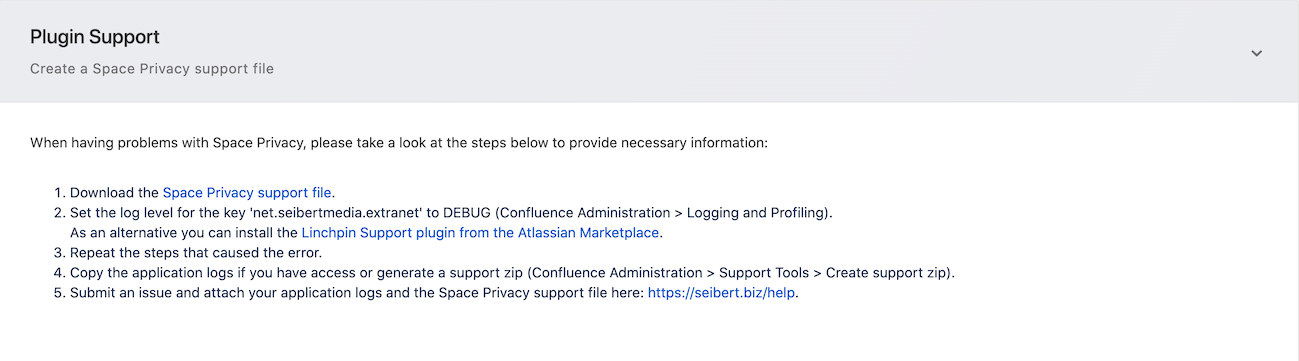
To download the support file, click on the Space Privacy support file link in step 1.
To create application logs, install Linchpin Support or navigate to Confluence Administration → Logging and Profiling and set the log level for the
net.seibertmedia.extranet key to DEBUG.
Then, repeat the steps to reproduce the problem.
Now, generate the support zip. To do that, navigate to Confluence administration → Support Tools → Create support zip.
Finally, submit us your issue and include the files.
The easiest way to contact us is via https://seibert.biz/help.

☁️ Looking for a Cloud-based Intranet?
Check out Mantra, your go-to alternative to Linchpin in the Atlassian Cloud!
Mantra is your a comprehensive solution for connecting teams, making collaboration a breeze, and keeping your company's internal communication strong and streamlined - all in the cloud.