
Documentation's navigation
On this page
Where to find the content colors configuration
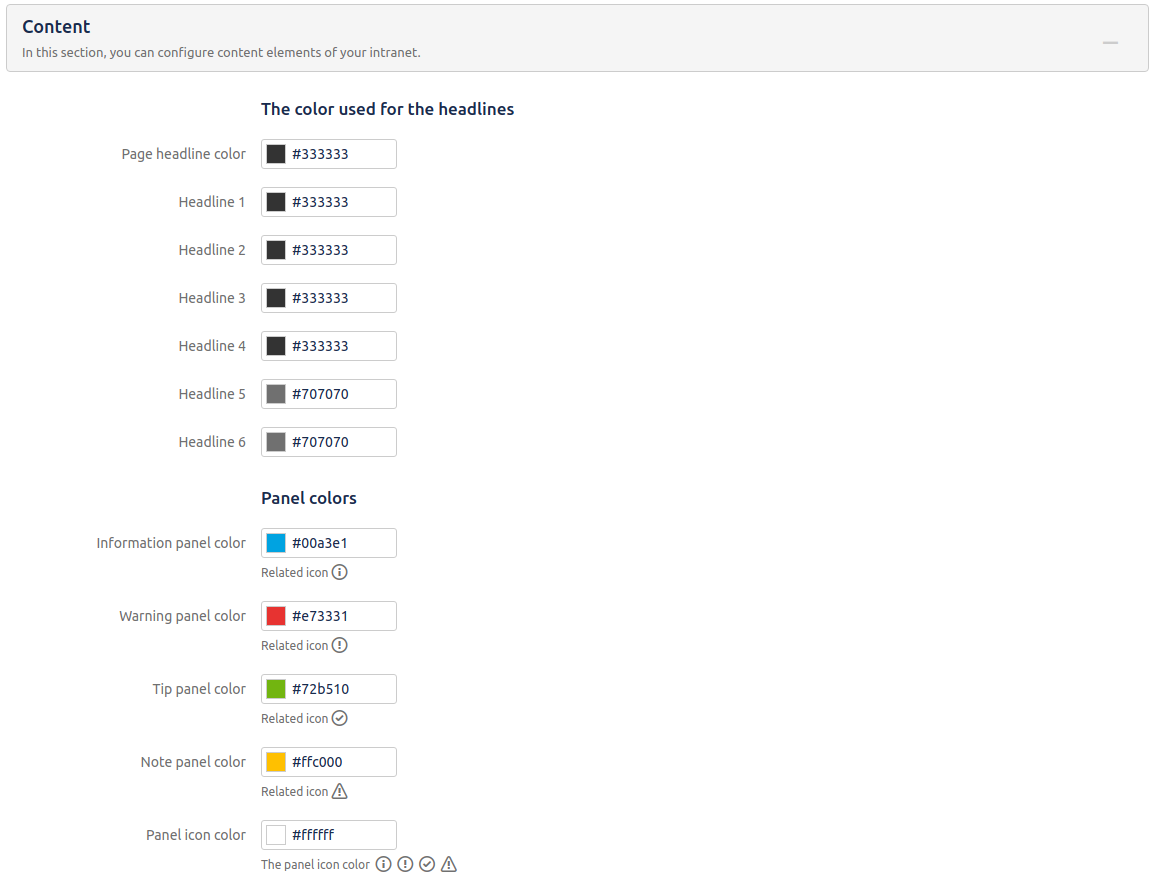
Navigate to Confluence administration > Linchpin Theme > Configuration > Content.
Colors used for headlines
Here you can change the colors used for the page headline and the heading elements H1 - H6.
You can use the built-in color picker or enter a hex value.
Confluence panel colors
Information panel color
Warning panel color
Changes the border color of the "Warning" macro.
Tip panel color
Changes the border color of the "Tip" macro.
Note panel color
Changes the border color of the "Note" macro.
Icon color
Changes the color of the icons which appear inside the "Info", "Warning", "Tip" and "Note" macros.
Please note: Make sure that Linchpin Theme is active.
Visit our documentation on how to activate your theme to learn more.

☁️ Looking for a Cloud-based Intranet?
Check out Mantra, your go-to alternative to Linchpin in the Atlassian Cloud!
Mantra is your a comprehensive solution for connecting teams, making collaboration a breeze, and keeping your company's internal communication strong and streamlined - all in the cloud.