

Linchpin User Profiles - Documentation
Create a meaningful and up to date profile
See the documentation for your Release
By default the user directories configured in Confluence (ADMINISTRATION > USERS & SECURITY > User Directories) are used to fill the user profiles. Alternatively, you can define a separate LDAP resource here (ADMINISTRATION > CUSTOM USER PROFILE > DATA SOURCES). The CUP add-on will then use this resource exclusively to fill the user profiles. A common use case would be to manage your users (name, password) and groups (confluence-admins) in a user directory managed by Confluence, but maintain user profile data (position, location etc.) in a different directory.

Choose the LDAP where the CUP will fetch the user field data
Configure a separate LDAP connection
The settings are pretty much the same as configuring a user directory in Confluence.
 Please note: The configured LDAP access is strictly read-only.
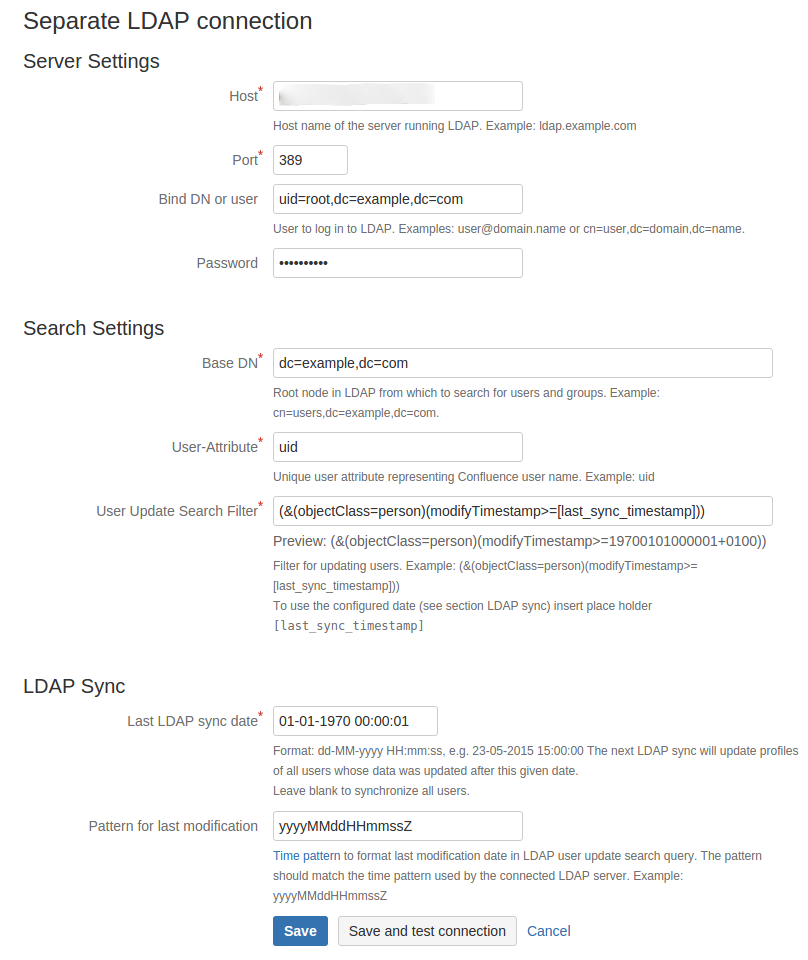
Server Settings
| Setting | Description | Confluence Name | Example |
|---|---|---|---|
| Host | Host name of the server running LDAP | Hostname | ldap.example.com |
| Port | Port | Mostly 389 | |
| Bind DN or user | User to log in to LDAP | Username | user@domain.name or cn=user,dc=domain,dc=name. |
| Password | Password |
Search Settings
| Setting | Description | Confluence Name | Example |
|---|---|---|---|
| Base DN | Root node in LDAP from which to search for users and groups | Base DN | cn=users,dc=example,dc=com |
| User-Attribute | Unique user attribute representing Confluence user name | - | uid |
| User Update Search Filter | Filter for updating users. To use the configured date (see section LDAP sync) insert place holder [last_sync_timestamp] | - | (&(objectClass=person)(modifyTimestamp>=[last_sync_timestamp])) |
LDAP Sync
| Setting | Description | Example |
|---|---|---|
| Last LDAP sync date | Format: dd-MM-yyyy HH:mm:ss, e.g. 23-05-2015 15:00:00 The next LDAP sync will update profiles of all users whose data was updated after this given date. Leave blank to synchronize all users. | 23-11-2015 15:00:00 |
| Pattern for last modification | Time pattern to format last modification date in LDAP user update search query. The pattern should match the time pattern used by the connected LDAP server. | yyyyMMddHHmmssZ |